PKI security after eMudhra: what an attacker needs and which controls stop it
Whoever holds eMudhra keys can forge certificates, but each attack needs other conditions as well: five vectors and how to cut them off.
This article is educational and does not replace a formal smart contract audit, legal advice, financial advice, or protocol-specific security review.
Eight eMudhra intermediate CAs, six for TLS and two for code signing, have private keys that can be recovered from the certificates themselves. With the six TLS ones, anyone can sign a certificate for any domain, and a client that has not been updated will accept it as valid. With the two code-signing ones, it was possible to sign software that Windows accepted as signed. That is not enough to intercept traffic: someone also has to be in the middle of the connection.
A compromised CA or intermediate does not, on its own, grant interception or remote code execution. To intercept, someone also has to control the network path, DNS, a proxy or the point packages are downloaded from, and the client has to still trust the affected chain. Updating the roots, or blocking the intermediates, removes that trust. Hashes, signatures and range checks stop tampering with packages and data, but not the reading of tokens or traffic.

The conditions of an attack
To intercept or tamper with a connection using these keys, two things have to happen at the same time:
- The client still trusts the affected chain and does not require Certificate Transparency (CT).
- The attacker controls a point on the path between client and server: the network, DNS resolution, a proxy or the package delivery point.
That is enough to read a token or a request. To slip in a tampered package or piece of data, a third condition is needed: that no other control detects the change, such as a pinned hash, a signature over the data or a range check.
The first condition has a nuance. The six TLS intermediates chain to emSign Root TLS CA - G3 and the two code-signing ones to emSign Root CS CA - G3; both sit under emSign ECC Root CA - G3, which is the root that appears in trust stores. In addition, each intermediate has a cross-signature from AAA Certificate Services, a Sectigo root. Removing only emSign ECC Root CA - G3 is not enough if the store still accepts AAA for TLS, as happens in an unpatched OpenJDK cacerts or in old versions of certifi. What cuts both paths is updating, because the fixed versions block the intermediates.
Cloudflare puts it this way: because the keys are weak, an attacker can create a fake certificate for any domain and use it to impersonate servers and intercept or modify traffic. Those are the mechanics of any man-in-the-middle attack. The difference is that the fake certificate passes the verification of a client that has not been updated.
Google and Dennis Jackson, of Mozilla, agree that there are no certificates from these intermediates in the CT logs, so browsers that require CT could not be attacked. The risk lies in clients that do not require CT: curl, language runtimes, pip, uv and container images. Docker says so about its CLI and daemon in the Docker Desktop 4.96.3 release notes, from 22 October: an attacker with network access could have used these certificates to intercept their TLS connections.
According to the CA itself, the intermediates were created on 30 April 2025, seven of the eight were never used in production and the one that was used did not issue any certificate. Jackson writes that it is not known whether anyone exploited the flaw against clients that do not require CT. There is no published evidence of abuse, but there is also no way to rule it out from the outside. That is why it makes sense to review what traffic went through those clients.
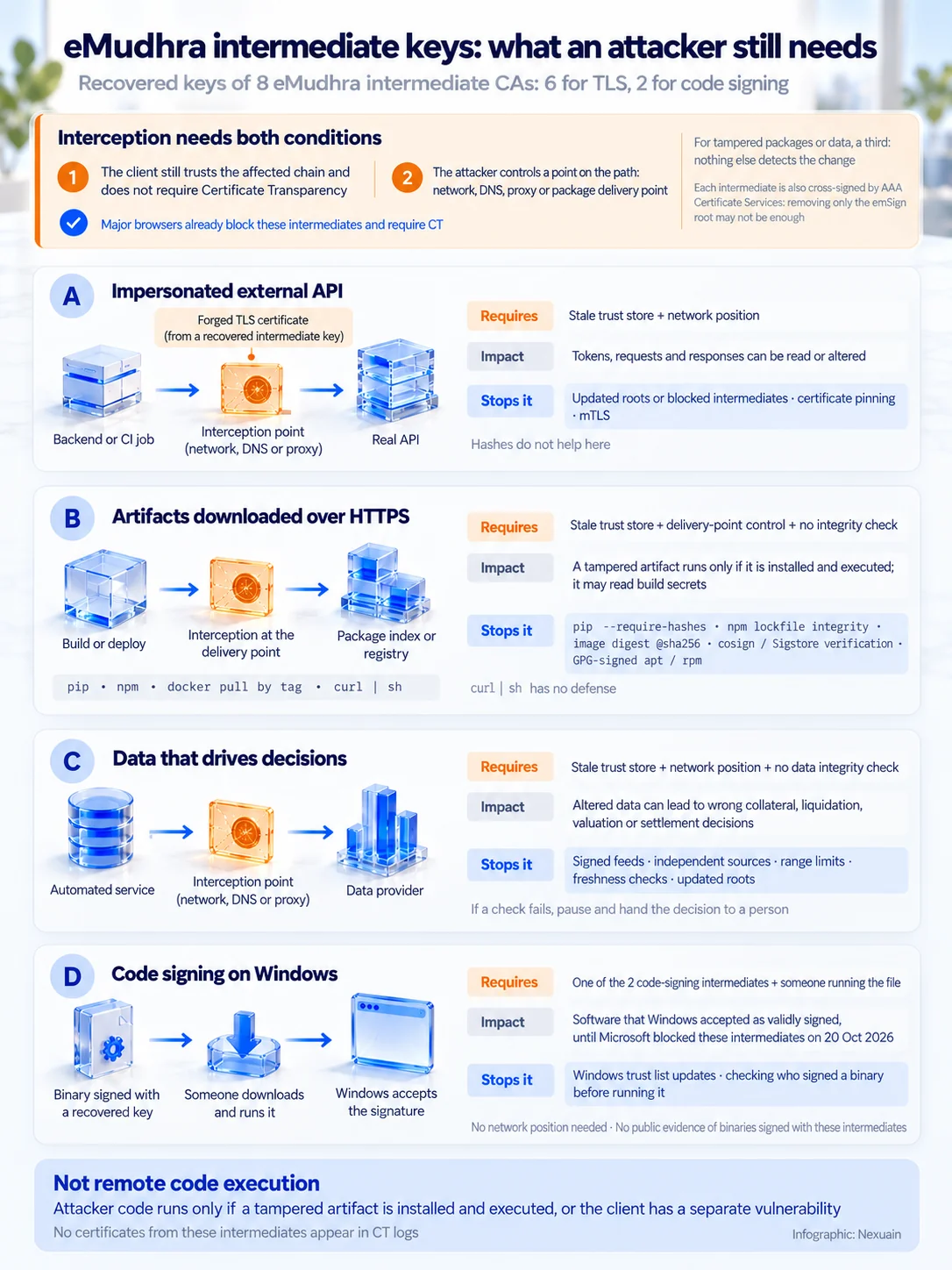
Vector A: impersonating an external API
With these keys, valid TLS certificates can be forged for any domain, but they only allow interception if the attacker also controls the network path (Wi-Fi, proxy, DNS or BGP) and the client still trusts the chain and does not require Certificate Transparency. Chrome, Firefox, Edge and Safari already block the intermediates and require CT.
A backend, a CI job or an agent calls an external API over HTTPS with a token in the header. If the attacker controls an interception point and the client accepts the fake chain, the call reaches the attacker instead of the provider. The attacker can read the token, the requests and the responses, and also change them.
No hash helps here: if the token travels over the intercepted connection, the attacker reads it. What cuts off this vector is up-to-date roots or blocked intermediates on the client, pinning or mTLS.
Vector B: artifacts downloaded over HTTPS
If the attacker manages to intercept an HTTPS download (docker pull by tag, pip, npm or curl | sh), they can serve a tampered artifact, but only when nothing verifies its integrity by another route. A pinned image digest, the npm lockfile integrity, pip --require-hashes, verification with cosign/Sigstore or apt/rpm repositories signed with GPG detect the change.
During a build or a deployment, images, packages and scripts are downloaded. If the attacker controls the delivery point and the client accepts the fake chain, the substituted artifact runs in the build or in production and can read whatever secrets it has at hand. Each download method has its defense, or lacks one:
- “docker pull image:tag” resolves the tag over the intercepted channel. “image@sha256:…” is addressed by content.
- npm checks the lockfile integrity for what is already pinned in it, but does not protect the first resolution or an “npm install” of a new package.
- pip and uv install whatever they are served unless hashes are required.
- “curl | sh” has no defense at all: whatever arrives is executed.
- apt and rpm verify GPG-signed metadata with a key that is already on the machine, even if the download does not use TLS.
In Python there is a detail that changes the order of things. Christian Heimes explains in the Python Discourse thread on the incident that pip always loads the roots of its internal certifi, in addition to the system ones, and that there is no supported way to turn that off. Updating the system is not enough: pip has to be updated.
Vector C: data that drives decisions
A service queries prices, balances or risk parameters over HTTPS and makes automatic decisions with them. If an attacker on the path impersonates the provider with a fake certificate, they can return altered data. The client receives it over a channel that looks valid, and the error ends up in collateral, liquidation, valuation or position-closing decisions.
Here TLS is only one layer. The controls that work even if the channel fails are in the data itself:
- Signed feeds: the provider signs the data and the client verifies the signature with a key it knows in advance, independently of the server certificate.
- Independent sources: compare the same value from more than one provider or oracle and do not act if they disagree.
- Limits: reject values outside the expected range or with sharp changes compared with the last accepted value.
- Freshness: require a timestamp and discard old or repeated data.
- Updated roots on the client, as in vectors A and B.
When any of those checks fails, the prudent course is to stop the automation and hand the decision to a person instead of acting on the doubtful data.
Vector D: code signing on Windows
Two of the eight intermediates (EM OV CS CA - G3B and G3C) are code-signing CAs (EKU codeSigning) and chain to roots that Windows trusts for Code Signing (emSign Root CS CA - G3 and AAA Certificate Services): with their keys it was possible to sign software that Windows accepted as validly signed, until Microsoft blocked them on 20 October 2026.
Mozilla's incident report (Bugzilla 2083449) puts it this way: six of the certificates are for TLS and the other two are for code signing and are trusted by Microsoft. This vector does not require being on the network path, but it does not give remote execution either: someone has to download and run the signed binary. There is no public record of binaries signed with these intermediates.
Vector E: signed payloads and client certificates
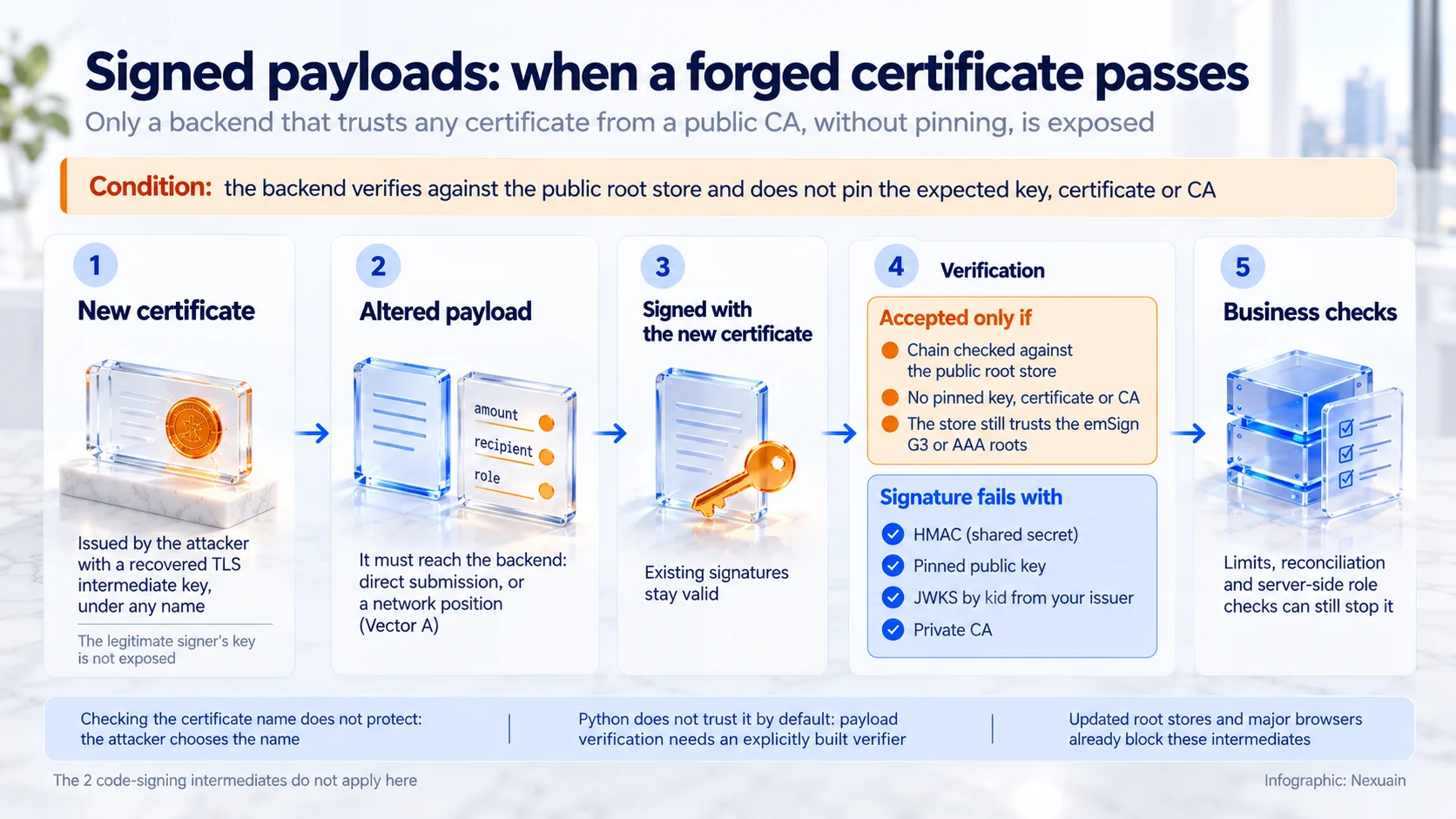
With the keys of the six TLS intermediates, an attacker can issue themselves a new certificate with any name they want, sign an altered payload with it or present it as a client certificate in mTLS. Only a backend that accepts any signature or client certificate that chains to the public root store (certifi, the system store or Java's cacerts) without pinning the key, certificate or CA it expects would accept it. The most common payload-signing schemes (HMAC, a pinned public key, JWKS by “kid” or a private CA) are not affected.
The attacker does not obtain the key or the certificate of any legitimate signer, and signatures that already existed remain exactly as valid as before. What they get is a certificate of their own that passes as valid with a verifier that only checks that the chain reaches a public root. Checking the certificate name does not protect either, because the attacker sets whatever name they want.
The cases where this can happen are specific:
- JWS or JWT tokens that carry their own certificate in the x5c header and are validated against the public store. RFC 7515 requires validating the chain, but that does not say who signed: the key has to come from a source that authenticates its origin.
- XML signatures (SAML, WS-Security) verified with signxml without parameters. Its documentation warns that, in that case, it trusts any signature made with a certificate accepted by the system CA store.
- mTLS servers that accept client certificates from any public CA and authorize by name. The six TLS intermediates allow issuing client certificates.
Python does not trust these certificates by default to verify signatures: the standard library does not verify payload signatures, and in cryptography the store and the verifier have to be built explicitly. In addition, the altered payload has to reach the backend: either the endpoint accepts direct submissions from any valid signer, or the attacker is on the path, as in vector A.
What they do not give: remote code execution
They do not give direct remote code execution: the forged certificate only allows impersonating a TLS server, and the attacker's code only runs if the victim installs and runs a tampered artifact (vector B) or if the client has a separate vulnerability.
Neither Mozilla, nor Google, nor Cloudflare describe code execution in their advisories: they talk about impersonating servers and intercepting or modifying traffic.
How to protect yourself
The detailed steps for each tool on macOS are in the remediation article linked at the end. Here is the minimum for each vector, with commands that were run as-is on Linux.
Against vector A: trust stores
The first step is knowing which versions you have. On a Debian or Ubuntu machine or image:
node --version
python3 -m pip list 2>/dev/null | grep -iE '^(pip|certifi|uv) '
dpkg -s ca-certificates | grep '^Version'
The minimum versions given by the primary sources:
- Node: 24.22.1, 22.23.4 or 26.12.1, depending on the branch (Node security advisory of 21 October).
- certifi 2026.10.19, pip 26.2.2 and uv 0.13.4 (Seth Larson's notice on Python Discourse).
- ca-certificates: the version your distribution publishes with the change. Until it exists, Jackson's page gives a procedure to distrust the affected roots and warns that it is not meant for normal users.
- Docker Desktop 4.96.3 or later. Its release notes say it removes trust in these certificates.
In addition, this grep finds in a repository the usual patterns that turn off verification in Python, Node, Go and curl. Turning it off is never the way out of a certificate error: a client without verification accepts any certificate, not just the ones from these intermediates.
grep -rnE --exclude-dir={.git,node_modules,.venv} \
  'verify *= *False|CERT_NONE|rejectUnauthorized: *false|NODE_TLS_REJECT_UNAUTHORIZED|InsecureSkipVerify: *true|curl +(-k|--insecure)' .
Each match has to be read: some will be in tests or local tools. The ones in code that calls external APIs are the ones that matter.
Two more measures reduce what can be lost. Restricting each service's outbound network traffic to the destinations it needs leaves fewer connections to intercept. And rotating the tokens that have travelled from non-updated clients over networks you do not control closes the exposure window retroactively.
Java, the most complex case
A JDK that has not been updated does not block the eMudhra certificates: it trusts those intermediates through emSign ECC Root CA - G3 and through the AAA Certificate Services cross-signature. And it is easy to believe everything is up to date when it is not. The OpenJDK advisory of 21 October (CVE-2026-91403) explains why:
- A separately installed OpenJDK runtime, downloaded as an archive, brings its own store and probably contains the compromised certificates. It has to be updated.
- The OpenJDK packages of Arch Linux, Debian, Devuan, Fedora, Gentoo, Oracle Linux, Red Hat Enterprise Linux and Ubuntu use the operating system certificates; there, updating the system ones is enough. FreeBSD and Homebrew ones have to be updated directly.
- If more than one runtime is installed, the step has to be repeated on all of them.
- Container images with Java carry their own JRE and their own store. Updating the host does not change them: they have to be rebuilt with a fixed JDK.
The fix is called JDK-8395142 in OpenJDK and JDK-8395555 in Oracle, and it does not remove roots: it adds the eight intermediates and their eight AAA cross-signatures to the JDK's list of blocked certificates. That list is the blocked.certs file in lib/security, or blacklisted.certs in Java 8. emSign ECC Root CA - G3 and AAA Certificate Services remain in the OpenJDK cacerts. That is why removing only the first is not enough, and removing AAA is not recommended: it can break connections to services that still chain to that root, and Jackson warns that distrusting it is not meant for normal users.
JDKs released before 21 October do not block these intermediates. Update to a fixed version and, if you cannot, replace lib/security/blocked.certs with the one Oracle publishes at https://ops.java/emudhra (in Java 8, blacklisted.certs) and restart the Java applications.
Versions that already include the block, according to their release notes or checked in the binary:
- Oracle JDK 27.0.1.0.2, 25.0.5.0.2, 21.0.13.0.2, 17.0.21.0.2, 11.0.33.0.2 and 8u511 b32 (1.8.0_511-b32), released on 21 October. OpenJDK publishes 27.0.1.0.2 on jdk.java.net.
- Amazon Corretto 25.0.5.0.9, 21.0.13.0.10 and 8.512.08.1.
- The current Homebrew formulas openjdk, openjdk@21 and openjdk@17.
Without a fix as of 23 October: Homebrew openjdk@11 and openjdk@8, Azul Zulu, the Red Hat Enterprise Linux OpenJDK packages and Temurin 8 and 11. On Oracle JDK 8, the 8u511 build released on 20 October (1.8.0_511-b09) is still affected: if “java -version” does not show “b32”, update. For Java 8 from Debian and Ubuntu there is no verified fixed version. Temurin 21 and 25 do not include the block, but they do not ship emSign ECC Root CA - G3 or AAA Certificate Services either, so they reject the chain.
ops.java is Oracle's official domain for this advisory, but on 23 October it returned a 403 error, so it is better not to depend on it alone: updating remains the main route. The macOS remediation article linked at the end has the detailed steps: the download, a script that checks the file format, keeps the entries it already had and saves a copy, and the validation with jshell. Deleting roots with keytool -delete is not the main route.
To know where to look, this command lists the stores of separately installed runtimes on a Linux machine or in a container:
find / -type f -name cacerts -path '*/lib/security/*' 2>/dev/nullFor each one, this other command says whether its cacerts contains either of the two roots. It searches by SHA-256 fingerprint, taken from the list Jackson publishes, because the alias changes depending on who built the JDK. Set JAVA_HOME to the folder of the JDK you are checking:
"$JAVA_HOME/bin/keytool" -list -v -cacerts -storepass changeit \
  | awk '/^Alias name:/ {alias=$0}
         /SHA256: 86:A1:EC:BA:08:9C:4A:8D:3B:BE:27:34:C6:12:BA:34:1D:81:3E:04:3C:F9:E8:A8:62:CD:5C:57:A3:6B:BE:6B/ {print alias, "-> emSign ECC Root CA - G3"}
         /SHA256: D7:A7:A0:FB:5D:7E:27:31:D7:71:E9:48:4E:BC:DE:F7:1D:5F:0C:3E:0A:29:48:78:2B:C8:3E:E0:EA:69:9E:F4/ {print alias, "-> AAA Certificate Services"}'
And this one counts how many of the 16 fingerprints, taken from the same list, are in blocked.certs. The first line of the file has to be “Algorithm=SHA-256”, and the count, 16; a lower number means the block is missing or incomplete. It also works to check a blocked.certs that was downloaded or copied before installing it. In Java 8 the path is "$JAVA_HOME/jre/lib/security/blacklisted.certs":
F="$JAVA_HOME/lib/security/blocked.certs"
head -1 "$F"
cat > /tmp/emudhra16.txt <<'L'
0164D7CEAE5BB909C272AF151FF44B1177AE9B47D9424B94F1D9558C30934D19
42C4ACCD12C4F59597925E1A08A7A90102608543809308D50EC427E118BA1493
432EC25F0D28DE9006D97BF752F17BBB2CD41F669933FCB072D9A1148D0261F3
45A883F349AEDFD5F3A649B5498FFB121712BA8B448F3F2A91DBC5A766FCDDBE
4B2460A466F95FD40113BCDCCA2CEB29B3B093921DE45474DA7DF48874C630B1
579480AEA166290BD3C643589E795FC0D0E54E86505D180F1DFF99EFD3199512
5F1DED4DD590AF74631290CF073B122A2AAC6A1FA479778A0BD43579BD832699
62B7F9868263F72F6911FC78CEAF72C1979158B7368BF648683BB2AA39B02E72
7485B51C0ED192878FA1D2F948FB529AE1842CC5086C4B67F7BE5B2039DE9489
84112972B8E59D14560AE7E7119654474AAD119990CF3722BFC1E3B91615E1FD
98B896625C0C230ADEEC3EB2CF6AAD5001ECF9156A68644E82374CE5833BC25B
9E39DE2881273ACC225A149C72BA3E0F51424963669AB633EE1DC7DF5DB067B4
A496E23AC0CAB8155FC9B117B97EAE368EFCBB9041AEC8804D5A308D2D01C2D8
CB6E15165AC802E9B3F993F16C25D41F4E81C21EBDE71AE1B012AC00BF9C7C3F
E7568FE6E12331F4FD7DE61DA4C7559D0F8EB192A218D4741A3BA75184333838
FD9D5C2DBBD4995AB69B8D50C439D9527B00529199C2FD01B2174EB58F07021F
L
grep -c -x -F -f /tmp/emudhra16.txt "$F"
How to read the result:
- Neither root in cacerts: that JDK does not trust the chain, even if it does not block it. That is the case with Temurin 21.0.13, with which these commands were tested, and of Temurin 25.0.5. On the other hand, Temurin 8u504 and 11.0.32.1, the latest released versions of those branches, do ship emSign ECC Root CA - G3.
- A root in cacerts and 16 in blocked.certs: the block is applied.
- A root in cacerts and fewer than 16 in blocked.certs: that JDK accepts the chain. It has to be updated or Oracle's blocked.certs applied, and the Java applications restarted. The OpenJDK advisory lists 27.0.1, 25.0.5, 21.0.13, 17.0.21, 11.0.32.1, 8u504 and earlier as affected.
- A Debian or Ubuntu JDK: its store is /etc/ssl/certs/java/cacerts, managed by the ca-certificates-java package. After updating the system certificates, Jackson's page says to regenerate it with “touch /var/lib/ca-certificates-java/fresh” and “dpkg-reconfigure ca-certificates-java”, as root.
To validate the result, the same jshell test used by the remediation guide tries to connect to a Jackson test server that serves a chain from these intermediates:
"$JAVA_HOME/bin/jshell" <<'JAVA'
import java.net.*;
import javax.net.ssl.*;

var url = URI.create("https://dv-g3b-emudhra.we-have-a-problem.com/").toURL();

try {
    var c = (HttpsURLConnection) url.openConnection();
    c.setConnectTimeout(10000);
    c.setReadTimeout(10000);
    System.out.println("WARNING: TLS ACCEPTED: " + c.getResponseCode());
} catch (SSLHandshakeException e) {
    System.out.println("TLS REJECTED: " + e.getMessage());
} catch (Exception e) {
    System.out.println("INCONCLUSIVE: " + e);
}
/exit
JAVA
With the block applied, the output has to be “TLS REJECTED” with “Untrusted certificate: CN=EM DV TLS CA - G3B”. On Temurin 21 and 25, which do not ship the roots, the rejection shows up as “PKIX path building failed”. In the test, a JDK with both roots in cacerts and the original blocked.certs answered “WARNING: TLS ACCEPTED: 200”.
If you can neither update nor replace the file, the OpenJDK advisory also proposes enabling revocation checking with “-Dcom.sun.net.ssl.checkRevocation=true -Dcom.sun.security.enableCRLDP=true”, and on JDK 17 or later verifying signed JARs with “jarsigner -verify -revcheck -strict”.
Against vector B: integrity of what you download
What is downloaded has to be checked against something the attacker does not control: a hash or a digest pinned beforehand, or a signature with a known key. By tool:
- Images: reference them by digest (“image@sha256:…”) in the Dockerfile FROM and in deployments, not only by tag. And rebuild without cache, as the Python notice asks: “docker build --pull --no-cache”.
- npm: install with “npm ci” from a versioned lockfile. The lockfile integrity protects what is already pinned; a new package has to be added from an updated network and client.
- Image and artifact signatures: verify them with cosign/Sigstore before deploying, requiring the expected identity. A verification that accepts any signature stops nothing.
- apt and rpm: do not install unsigned repositories or mark them as trusted to get past the error.
- Scripts: do not use “curl | sh”; download the script, check its hash or its signature if the project publishes one, and then run it.
For Python, pip's hash-checking mode. With --require-hashes, pip requires a hash for every package and stops if what was downloaded does not match. uv generates the file with the hashes:
uv --version
mkdir -p /tmp/emudhra-uv && cd /tmp/emudhra-uv
echo "certifi>=2026.10.19" > requirements.in
uv pip compile requirements.in --generate-hashes -o requirements.txt
grep -A1 "^certifi" requirements.txt
Generate the hashes with tools that are already updated and from a network you control. A hash computed over an intercepted download pins the wrong package.
The installation with hashes looks like this:
python3 -m venv /tmp/emudhra-hash && . /tmp/emudhra-hash/bin/activate
cd /tmp/emudhra-hash
cat > requirements.txt <<'REQ'
certifi==2026.10.19 \
    --hash=sha256:42d35340cc5b9ba78e818ddbff0c5b1c2b779de448a340fd1b989f5fa8670e1b
REQ
python3 -m pip install --require-hashes -r requirements.txt
If the downloaded package is not the expected one, pip stops before installing it. With the hash deliberately altered, the output is this:
ERROR: THESE PACKAGES DO NOT MATCH THE HASHES FROM THE REQUIREMENTS FILE.
    certifi==2026.10.19 from https://files.pythonhosted.org/packages/.../certifi-2026.10.19-py3-none-any.whl
        Expected sha256 00d35340cc5b9ba78e818ddbff0c5b1c2b779de448a340fd1b989f5fa8670e1b
             Got        42d35340cc5b9ba78e818ddbff0c5b1c2b779de448a340fd1b989f5fa8670e1b
Build secrets should not go in build arguments or environment variables: Docker's documentation says they are not suitable for that and recommends secret mounts.
Against vector D: code signing on Windows
Microsoft distributes the block of these intermediates through the automatic updates of the Windows trusted certificate list, according to Jackson's page. The first thing is that machines receive those updates.
A valid signature is not enough to trust a binary. Before running downloaded software, it is worth checking who signs it: in PowerShell, Get-AuthenticodeSignature shows the signer's certificate. A binary whose chain goes through EM OV CS CA - G3B or EM OV CS CA - G3C should not be run.
Against vector E: pin whom you trust
The defense is not to delegate the signer's identity to the public store:
- Verify with a pinned key or certificate, shared out of band, with HMAC or with the issuer JWKS you have configured, resolving the key by “kid”.
- Do not use the certificate carried by the token or message itself as the verification key.
- In signxml, pass x509_cert= with the expected certificate or ca_pem_file= with your CA; cert_subject_name only checks the name.
- For mTLS, issue client certificates with a private CA and load only that CA on the server.
- Require the purpose (EKU) when verifying a chain.
- Keep the business validations on the server: limits, role-based authorization and reconciliation.
What to review this week
- Which runtime and which trust store each internet-facing client uses, including CI jobs and agents.
- How many JDKs there are on each machine and each image, whether those that contain emSign ECC Root CA - G3 or AAA Certificate Services already have the 16 fingerprints in blocked.certs and whether their applications have been restarted since.
- Whether pip, uv and certifi are at the minimum versions of the Python notice in each image, and whether the images have been rebuilt without cache.
- Whether images are referenced by digest, whether npm installs from the lockfile and whether production requirements use hashes.
- Whether any code turns off TLS verification.
- Which tokens have gone through non-updated clients and whether it is worth rotating them.
- Whether Windows machines receive the automatic certificate updates.
- Which automatic decisions depend on external data without a signature, without a second source or without limits.
- Which signature or client certificate verifiers accept any chain that reaches the public store.
With up-to-date TLS roots, or with the 8 intermediates blocked, the forged certificate stops working; hashes and signatures add a second barrier for what is downloaded.
If you want to discuss these checks in your own services or builds, you can write to us from the contact page; in the message, mention this article and the service or pipeline you have in mind, without secrets, tokens or confidential operational material.
Source registry
Sources consulted on 23 October 2026. Run on Linux, on Debian, with the output saved: the version inventory, the grep, the hash generation with uv, the installation with hashes, correct and altered, and the Java commands on a Temurin JDK and on copies with the roots added, with the original blocked.certs and with the 16 fingerprints, including the jshell connection to Jackson's test server. Not run: docker, npm, cosign or PowerShell, nor anything on macOS or Windows.
- Mozilla Bugzilla 2083449: incident report
- Python Discourse: information for Python users
- Cloudflare Blog, 20/10/2026
- Google Security Blog, 20/10/2026
- Mozilla Security Blog, 20/10/2026
- Dennis Jackson: incident summary
- Dennis Jackson: impacted intermediates
- Dennis Jackson: roots of the intermediates
- The CA's statement on the incident
- Node.js: October 2026 security releases
- OpenJDK: vulnerability advisory of 21/10/2026
- Oracle Security Alert CVE-2026-91403
- Oracle JDK 25.0.5.0.2: release notes
- Oracle JDK 8u511 b32: release notes
- Oracle JDK 8u511: release notes
- OpenJDK 27.0.1.0.2 on jdk.java.net
- Amazon Corretto 25: CHANGELOG
- Amazon Corretto 8: CHANGELOG
- Homebrew: openjdk formula
- OpenJDK: cacerts
- Docker Desktop release notes, 4.96.3
- RFC 7515: JSON Web Signature
- signxml: establishing trust
- cryptography: X.509 verification
- pip: hash-checking mode
- uv: CLI reference
- Docker: build secrets
- Docker: build variables
Related reading
Need help applying this to your launch or workflow?
Request a technical review and we will map the safest first step.